Sensitive Data Exposure in a Moodle Config File
Process
Let’s say your target is example.com. You begin with some Google dorking using simple queries, but nothing interesting comes up.
After the initial Google Dorking yielded no interesting results, I moved on to subdomain enumeration using a reliable tool called subfinder:
1
subfinder -all -silent -d example.com -o subfinder.txt
Next, I checked which subdomains were alive using httpx:
1
cat subfinder.txt | httpx -silent -sc -probe -title -td -ip -t 90 -mc 200,404,403,302,301,303,304,305,306,307,302 -o live1.txt
To dig deeper, I performed subdomain enumeration on subdomains, a technique that often uncovers hidden gems. After repeating the last command, I found a few new subdomains to test, which could potentially have interesting vulnerabilities , and found this one https://x.x.example.com
One of my favorite things to do is directory fuzzing. There are many great tools for this, like dirb, gobuster, or dirsearch. Personally, I prefer dirsearch because it offers valuable paths and is fast. I kicked it off with the following command:
1
dirsearch -u https://example.com/ -t 150 -x 403,404,500,429 -i 200,301,302 --random-agent
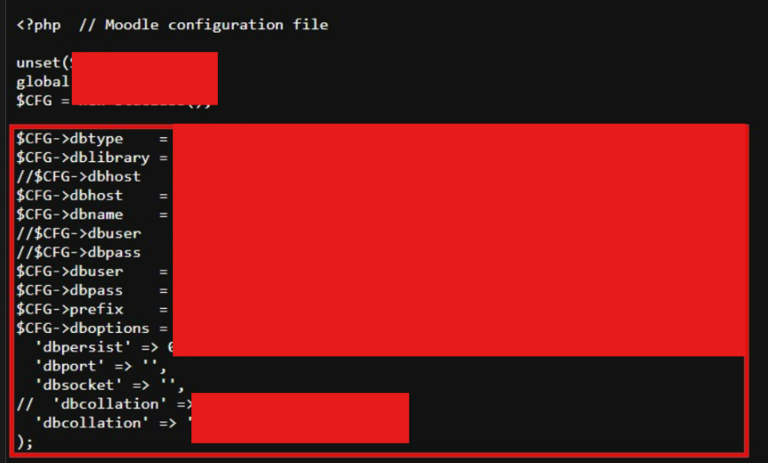
and found many 200 OK, but there are most file interesting which called config.php.save 
This write-up dates back to when the
config.php.save filewas still present. However, since the bug was resolved, the file has now been removed from the results.
Accessing the config.php.save file revealed sensitive information, such as the database username (dbuser), password (dbpass), and other critical details. This type of exposure can lead to severe security risks if not addressed.  Sometimes you won’t find anything right away, but don’t let that stop you. Every step gets you closer to a win. Keep learning, stay curious, and don’t give up—success comes to those who keep going! 🎉
Update: Resolved 🎉🎉
